
Japan eSIM vs Pocket WiFi (2026): Which One Do You Actually Need?
Last updated: February 2026
Japan is one of the few countries where pocket WiFi is still genuinely popular — and for good reason. Free WiFi is sparse, you're constantly using your phone for trains and translation, and until recently pocket WiFi was the most reliable option.
But eSIMs have caught up. So which one should you choose?
We sell eSIMs, so we're naturally biased toward them. But pocket WiFi is still the better choice in some situations — and we'll be upfront about when that's the case.
The short version
- Solo traveler or couple: eSIM is cheaper, lighter, and simpler
- Group of 3+: Pocket WiFi can save money (one rental vs. multiple eSIMs)
- Phone doesn't support eSIM: Pocket WiFi is your best option
- Need to connect laptops/tablets: Pocket WiFi is designed for this
- Want to split up during the day: eSIM — everyone has their own connection
Based on pricing and policies checked February 2026.
eSIM vs pocket WiFi: side by side
Here's the comparison, stripped down to what actually matters when you're packing for Japan.
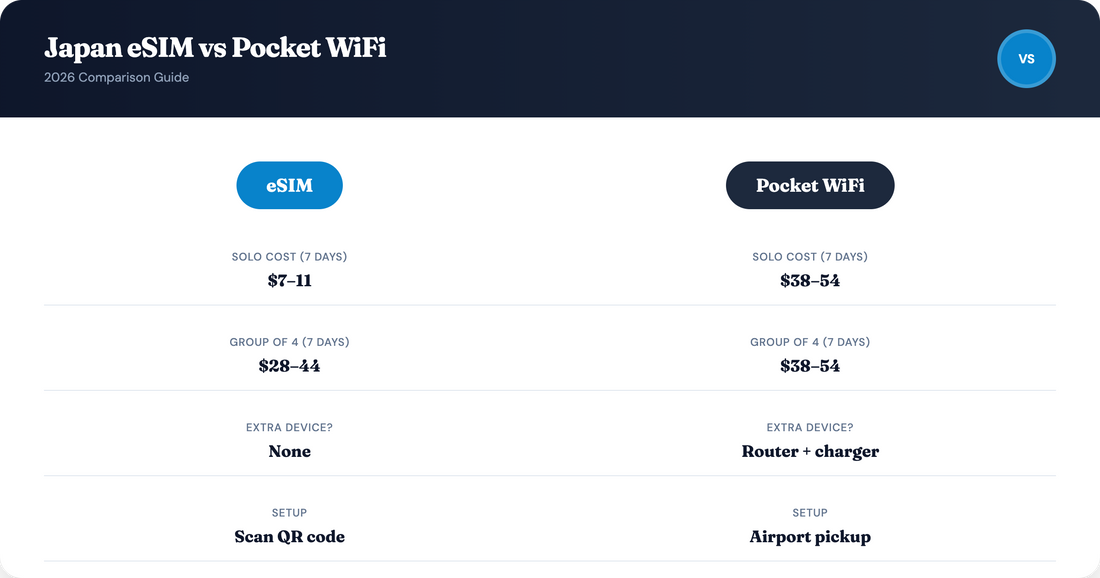
| eSIM | Pocket WiFi | |
|---|---|---|
| Cost (solo, 7 days) | $7–11 (5 GB fixed plan) | $38–54 (unlimited) |
| Cost (group of 4, 7 days) | $28–44 (4 × eSIMs) | $38–54 (1 rental) |
| Setup | Buy online, scan QR code, done | Pre-order, pick up at airport |
| Extra device to carry? | No | Yes — router + charger/power bank |
| Battery concerns? | Uses your phone battery (normal) | Separate battery (~9–20 hrs) |
| Devices connected | Your phone (hotspot possible) | 5–10 devices simultaneously |
| Network | Depends on provider (1–4 networks) | Usually SoftBank or docomo |
| Phone compatibility | Needs eSIM-compatible, unlocked phone | Any WiFi-capable device |
| Keep your home number? | Yes — dual SIM | Yes — no SIM change needed |
| Return required? | No — delete profile when done | Yes — airport counter or mailbox |
| Risk of loss/damage fees? | None | ¥20,000–40,000 replacement fee |
When an eSIM is the better choice
- You're traveling solo or as a couple. Two eSIMs cost less than one pocket WiFi rental — and each person has their own independent connection. You can split up for the day without worrying about who has the router.
- You don't want to carry another device. Japan already has you juggling a Suica card, portable charger, camera, maybe a JR Pass. A pocket WiFi router with its own battery and charging cable adds to the pile. An eSIM adds nothing to your bag.
- You want to be connected the second you land. Install your Japan eSIM before departure and activate it on the runway. With pocket WiFi, you need to find the pickup counter — which can mean navigating Narita or Haneda without internet first.
- You're coming back late on departure day. Pocket WiFi needs to be returned at the airport. If your flight is early or you're rushing, this is one more thing to manage. eSIMs require zero return logistics.
- You're a light to moderate data user. Maps, Google Translate, messaging, and photo uploads use about 500 MB–1.5 GB per day. A fixed eSIM plan covers this comfortably and cheaply — without paying for "unlimited" data you don't need.
When pocket WiFi is the better choice
- You're traveling as a group or family. One pocket WiFi device can connect 5–10 people. For a family of four on a 7-day trip, one pocket WiFi rental ($38–54) is cheaper than four individual eSIMs — and keeps everyone connected on the same device.
- Your phone doesn't support eSIM. Older phones, some budget Android models, and carrier-locked devices can't use eSIMs. Pocket WiFi works with any phone, tablet, or laptop that connects to WiFi — no compatibility check needed.
- You need to connect a laptop regularly. If you're working remotely from cafés and hotels, pocket WiFi gives your laptop a dedicated connection without draining your phone battery as a hotspot. Some eSIM providers also limit or restrict hotspot use.
- You want truly unlimited data without thinking. Some pocket WiFi plans offer unlimited data with generous daily caps (5–10 GB/day at high speed). eSIM "unlimited" plans tend to have tighter FUPs, often throttling after 1–3 GB/day.
- You want a dedicated device for kids. Traveling with children who need internet on a tablet? A pocket WiFi keeps them connected without giving them your phone or buying them a separate eSIM.
Cost comparison: real numbers
The cost math changes depending on how many people need internet. Here's a practical breakdown.
| Scenario (7 days) | eSIM cost | Pocket WiFi cost | Better value? |
|---|---|---|---|
| 1 person, 5 GB | ~$11 | ~$38–54 | eSIM |
| 2 people, 5 GB each | ~$22 | ~$38–54 | eSIM |
| 3 people, 5 GB each | ~$33 | ~$38–54 | Close — depends |
| 4 people, 5 GB each | ~$44 | ~$38–54 | Pocket WiFi |
eSIM prices based on typical 5 GB / 30-day plans (~$11). Pocket WiFi based on Ninja WiFi unlimited 7-day rental. Prices vary by provider and can change.
The breakeven point is around 3 people. Below that, eSIMs are cheaper. Above that, pocket WiFi starts to make financial sense — though the convenience trade-offs (carrying a device, staying together, return logistics) still apply.
Pocket WiFi: costs people forget about
Pocket WiFi pricing looks simple — ¥440/day or whatever the listing says. But there are costs and friction that don't show up in the headline price.
- Insurance: Optional but strongly recommended. Typically ¥200–550/day. Without it, a lost or broken device costs ¥20,000–40,000 (~$130–260). Over a 7-day trip, insurance adds $9–25.
- Shipping/delivery fees: Some providers charge ¥550–1,100 for hotel delivery or charge different rates for airport vs. mail return.
- Return logistics: You must return the device before leaving Japan — usually at an airport counter, designated box, or by mail with a prepaid envelope. Forgetting to return means extra daily charges.
- Battery management: Pocket WiFi batteries last 9–20 hours depending on the device. On a long day in Japan (many are), you'll either carry a power bank or risk losing connection mid-afternoon.
- The "who has the WiFi?" problem: If you're a couple or group and someone carries the pocket WiFi, the rest lose connection when you split up — even briefly. This is a daily friction point in practice.
eSIM: limitations to know about
- Phone compatibility: Your phone must support eSIM and be unlocked. Most phones from 2020 onward qualify — but check before you buy. Carrier-locked phones may not work.
- Data-only: Most Japan eSIMs provide data only — no Japanese phone number, no SMS. This is fine for the vast majority of travelers, but worth knowing.
- Hotspot limits: Some eSIM providers restrict or cap hotspot sharing. If you need to share your connection with a laptop or tablet regularly, verify the provider's hotspot policy.
- "Unlimited" throttling: eSIM unlimited plans tend to have tighter fair usage caps (often 1–3 GB/day) than pocket WiFi unlimited plans (often 5–10 GB/day). If you're a heavy data user, pocket WiFi's unlimited plans may actually deliver more usable high-speed data.
- Setup requires some tech comfort. Installing an eSIM involves scanning a QR code and adjusting phone settings. It takes 5 minutes, but pocket WiFi's "turn on and enter password" simplicity may appeal more to some travelers.
Coverage: do they perform differently?
Both eSIMs and pocket WiFi use the same Japanese mobile networks — NTT docomo, KDDI/au, SoftBank, and Rakuten Mobile. The coverage difference isn't between eSIM and pocket WiFi as technologies. It's between which network each provider connects to.
A pocket WiFi rental on SoftBank has the same coverage as an eSIM on SoftBank. The technology doesn't change the signal.
Where eSIMs can have an edge: some eSIM providers connect to multiple Japanese networks. Travelsim Asia connects to all four carriers, meaning your phone automatically selects the strongest signal. Most pocket WiFi devices are locked to a single network (usually SoftBank).
Bottom line on coverage: Neither eSIM nor pocket WiFi is inherently better. What matters is the network — check which carrier your provider uses, not whether it's an eSIM or pocket WiFi.
Quick decision guide
| Your situation | Recommendation |
|---|---|
| Solo traveler, eSIM-compatible phone | eSIM |
| Couple, both have eSIM phones | eSIM (each) |
| Family of 4 with young kids | Pocket WiFi |
| Group of friends who may split up | eSIM (each) |
| Older phone, no eSIM support | Pocket WiFi |
| Digital nomad, needs laptop connection daily | Pocket WiFi or eSIM with hotspot |
| Short trip (3–5 days), light data use | eSIM |
| Long trip (2+ weeks), heavy data user | Either — compare per-day costs |
If you decide on pocket WiFi
We don't sell pocket WiFi, so here's a neutral overview of the main providers in Japan. Check their websites for current pricing — rates change frequently.
| Provider | Network | Data | Devices | Pickup/return |
|---|---|---|---|---|
| Ninja WiFi | SoftBank | 1–10 GB/day or unlimited | Up to 5 | Major airports |
| Japan Wireless | SoftBank | Unlimited, no speed cap | Up to 10 | Airports, hotels, mail |
| Sakura Mobile | NTT docomo | Unlimited | Up to 5 | Airports, hotels, mail |
Pricing and policies checked February 2026. "Unlimited" plans may still apply fair usage limits — always read the fine print.
If you decide on an eSIM
We've written a detailed comparison of the major Japan eSIM providers — covering networks, throttling policies, prices, and what each one is best for:
- Japan eSIM Prices 2026 — Airalo, Holafly, Nomad & more compared.
- Cheapest Japan eSIM 2026 — Pure price comparison - lowest price at every data tier, compared across all major providers.
- Best eSIM for Japan (2026) — comparison of Airalo, Holafly, Nomad, Saily, Ubigi, and Travelsim Asia on the 5 criteria that actually matter.
- How much data do you need for Japan? — Full breakdown on how much data you need on a typical trip to Japan.
- Travelsim Asia vs Airalo — head-to-head price and coverage comparison for Japan.
- How to Buy and Install a Japan eSIM — step-by-step for iPhone and Android, activation at Narita/Haneda.
Frequently asked questions
📶 Is an eSIM or pocket WiFi better for Japan?
For most solo travelers and couples, an eSIM is cheaper, lighter, and more convenient. For groups of 3+ sharing one connection, families with kids on tablets, or travelers with phones that don't support eSIM, pocket WiFi can be more practical.
💰 How much does pocket WiFi cost in Japan?
Typically ¥440–1,980 per day depending on the provider and plan. A 7-day unlimited rental usually costs $38–70 USD. Factor in optional insurance ($9–25 for 7 days) and potential delivery fees.
💰 How much does an eSIM cost for Japan?
Plans start from around $3.99 for 1 GB. A 5 GB plan (enough for most 7-day trips) costs $7–11. A 10 GB plan for two weeks typically costs $17–18.
🚄 Does pocket WiFi work on the Shinkansen?
Yes. Pocket WiFi devices use the same Japanese mobile networks as eSIMs, which cover all Shinkansen routes. Brief signal drops in tunnels happen with both technologies.
📱 Can my phone use an eSIM?
Most phones from 2020 onward support eSIM: iPhone XR and newer, Google Pixel 3 and newer, Samsung Galaxy S20 and newer. Your phone must be unlocked. Check under Settings → Cellular → Add eSIM.
📦 Do I have to return pocket WiFi at the airport?
Yes. Most rentals require return at an airport counter, designated box, or via prepaid mail before you leave Japan. Forgetting means extra charges. eSIMs have no return requirement.
🔗 Can I share my eSIM connection with others?
You can use your phone as a hotspot, but it drains your battery and uses your data faster. Some providers limit hotspot use. Pocket WiFi is purpose-built for sharing — it's the better option if multi-device connectivity is important to you.
⚠️ What if I lose a pocket WiFi?
Replacement fees typically run ¥20,000–40,000 ($130–260 USD). Optional daily insurance can reduce or waive this. This risk doesn't apply to eSIMs.
The bottom line
Pocket WiFi isn't outdated — it solves a real set of problems, especially for groups and travelers with non-eSIM devices. But for most individual travelers visiting Japan in 2026, an eSIM is cheaper, lighter, and one less thing to manage on a trip that already involves plenty of logistics.
The right choice depends on how you travel, not which technology is "better."
Not sure what you need? Our support team can help you choose — available 24/7 via email and live chat.